
Introduction
AI + MIDI tools have exploded this year. We’ve put in the hours testing almost everything out there, and we’re breaking the landscape into three clear buckets:
AI MIDI Generators — Dropdown/Button-to-MIDI
AI MIDI Generators — Text-to-MIDI
Audio-to-MIDI AI Converters
How to Navigate this Article: In each category, we list tools in order – starting with our favourite and ending with our least favourite. To stay impartial, our own tool appears at the bottom of each section. You can decide if it deserves the top spot.
We’ve tested (or are actively testing) nearly every option, so the takes below come from real sessions—not press releases. For each tool, we’ll share what it’s actually good for in a production workflow and include a simple difficulty rating so you know how hard it is to learn and use.
Table of Contents
1. Types of AI MIDI Tools
Dropdown/Button-to-MIDI
Text-to-MIDI
Audio-to-MIDI
2. Button/Dropdown-to-MIDI AI
LANDR Composer (formerly ORB: Producer Suite 3)
Hookpad Aria: Songwriting by Numbers
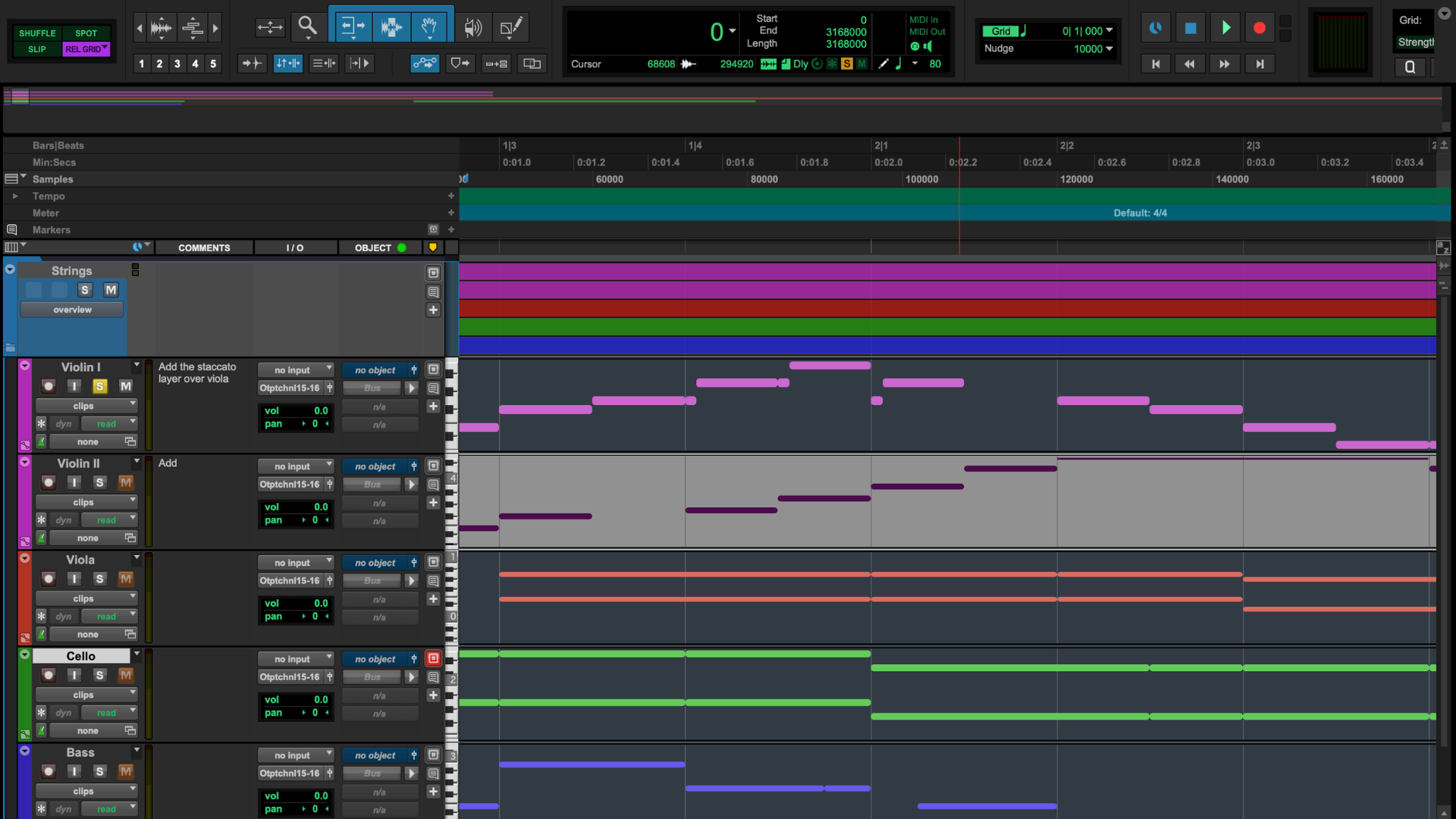
Google Magenta Studio Plugin: The First Top-Notch AI MIDI generators Bundle
OpenAI Musenet: Discontinued OpenAI Experiment
Lemonaide: Drop-Downs for Beginner Rap Producers
MIDI Generator - midimaker.io: When AI MIDI Meets Sampler
AIVA: Early AI MIDI Generator
Sony’s Flow Machines: Ahead of Its Time, or Just Lost?
Unison MIDI Wizard 2.0: Magic or Marketing?
Staccato – Extend Feature: Automatically Continue Your Own Tracks
3. Text-to-MIDI AI
Cai.audio: A Unique Way to Brainstorm
Muse.art: An Extension of Ableton
ChordChord: Canvas - an AI Theory Tool
ChatGPT as a Text-to-MIDI AI Generator
Wavtool: Discontinued AI DAW
MIDI Agent: Transcribe MIDI with Language
Staccato: The Most Advanced AI MIDI Generator
4. Special Mention: Audio-to-MIDI AI
Samplab
AI-MIDI.com
Spotify Basic Pitch
5. MIDI AI FAQ
Types of AI MIDI Tools
Dropdown/Button-to-MIDI
Yes, there are different kinds of AI MIDI generators. With dropdown/button-to-MIDI tools, users typically select various pre-set parameters such as style, meter, orchestration, and key from dropdown menus or by pressing buttons, and the AI generates MIDI based on these inputs. Where some of these tools restrict you to a fixed menu of choices, others are designed to keep you in control. For example, with Staccato’s Extend feature, you start from your own MIDI, type up a prompt that requests an extension, and the system develops the next section in your style—maintaining your rhythm, harmony, and overall vibe.
Text-to-MIDI
Text-to-MIDI tools on the other hand, turn plain-language prompts into MIDI. In other words, you can "talk" to the model instead of adjusting a fixed number of composition parameters. For example, you can input a prompt like, "Create an ambient loop with low drones building in fifths to give depth and a slight pulse with a low bass drum, or kick drum." In a couple of seconds, your thoughts are translated into MIDI, which you can use as a sketch or build upon. It is still your creation, your idea; Text-to-MIDI simply optimizes your workflow and saves time by acting as a real assistant, not a replacement for the creative mind. For example, with Staccato’s Create feature, you can turn text prompts into MIDI – but you can also ask it to rewrite your MIDI files, or create accompaniments.
Audio-to-MIDI
Unlike the first two categories that generate MIDI from your prompts or parameter choices, audio-to-MIDI tools (also AI) convert your recorded audio into MIDI. Results vary with source material: clean, monophonic lines track best, while dense chords, heavy effects, and loose timing can confuse detection. The usual workflow is capture → detect tempo/key → convert → tidy up (quantize, fix velocities) → assign instruments.
Button/Dropdown-to-MIDI AI
LANDR Composer (formerly ORB: Producers Suite 3)
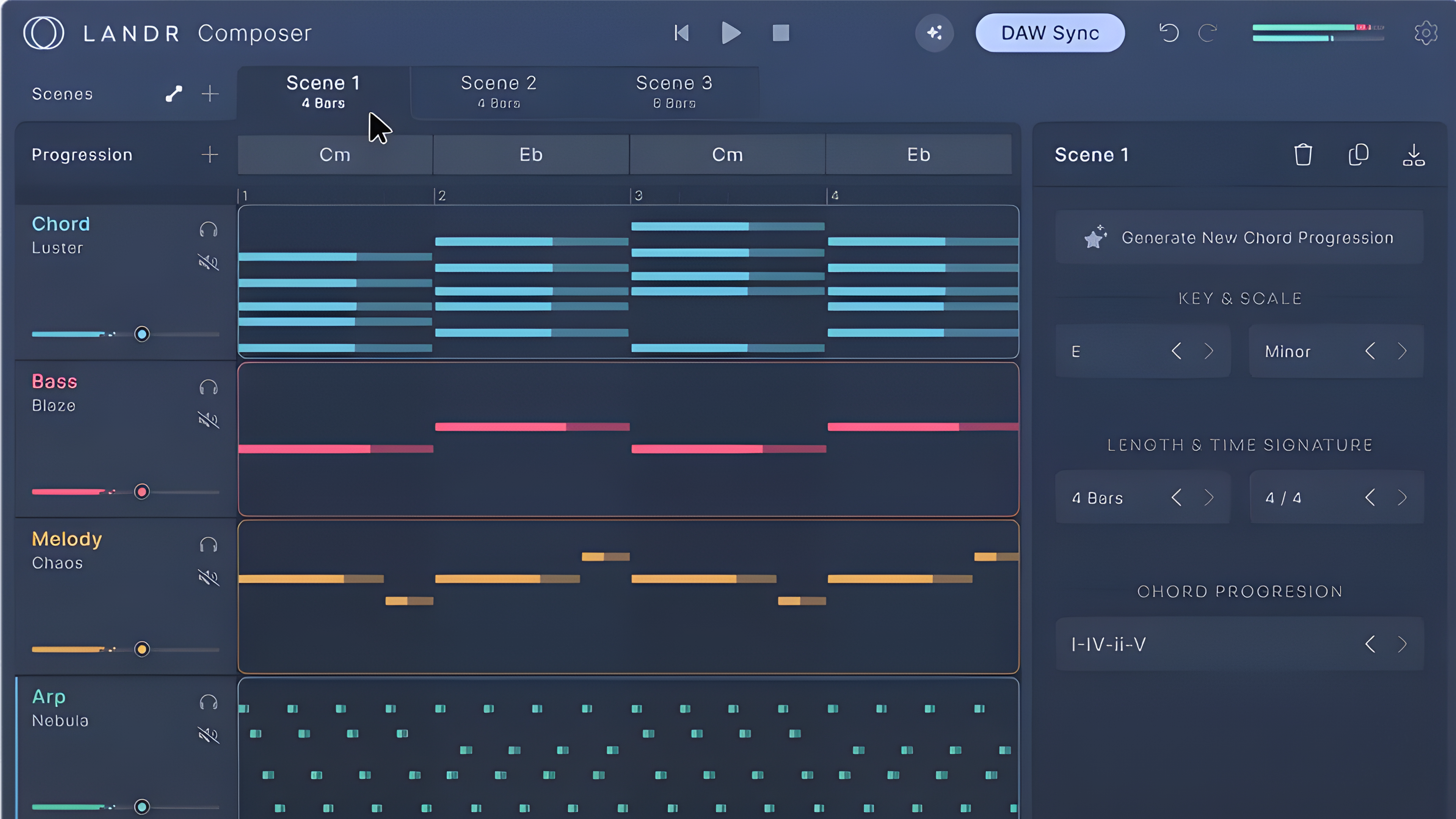
LANDR Composer is essentially an upgraded version of ORB Producer, giving you control over melody, chords, bass, and arpeggios — all generated instantly with the AI midi generator button. You can add new parts by clicking the plus icon on each component, and the plugin automatically creates elements that match your existing material in style and structure.
It feels like a DAW inside your DAW — with automation, panning, volume, and transport controls built in. The interface is simple but surprisingly powerful, letting you shape ideas quickly without leaving the plugin. LANDR Composer also includes a solid collection of built-in sounds, covering basses, keys, leads, pads, and more — good enough not just for sketching, but even for building full demo tracks.
Another smart feature is the scene system, which lets you create and switch between different versions of your composition without losing earlier work. It also syncs directly with your DAW, so you can test ideas or vocal lines in real time without dragging and dropping MIDI files.
You also get a lane progression and chord panel, allowing you to extend material, tweak harmony, and control chord complexity with ease. Once you’re happy with the result, you can simply drag everything into your DAW and continue refining it. LANDR Composer works best as a creative assistant — a fast and structured way to generate ideas and keep your workflow focused on creativity instead of setup.
Price: $149 (or included with LANDR Studio subscription)
Level: Beginner Friendly
Format: VST3, AU, AAX plugin
Hookpad Aria: Songwriting by Numbers

HookPad’s Aria, introduced in 2024, brings AI MIDI generator, as music creation assistant to HookTheory’s popular browser-based MIDI platform. Designed as an add-on, Aria enhances and builds on existing musical content rather than creating entirely new compositions.
Unlike tools such as AIVA, which aim to generate complete compositions, Hookpad Aria is designed as a true co-writer. Musicians describe it as a creative partner they turn to when inspiration runs dry. Using Aria is straightforward: users create or load a project in HookPad, highlight specific sections, and request AI suggestions for chord progressions or melodies. Its seamless integration within the Hookpad editor allows users to tweak and reshape ideas freely, maintaining full creative control.
That said, Hookpad has a few limitations — most notably, it’s entirely web-based, which can slow down workflow during intensive sessions. Aria could serve as an excellent starting point for aspiring songwriters, but it’s still difficult to see it becoming an essential tool for seasoned professionals.
Aria’s underlying technology blends Google Deepmind’s open-source Anticipatory Music Transformer with HookTheory’s vast database of over 50,000 MIDI-formatted transcriptions. However, its use of community-generated data for fine-tuning raises potential copyright concerns, an area where some competitors take more precautionary steps.
Despite some limitations, Aria AI midi generator adds a creative edge to HookPad’s ecosystem. For users who thrive within HookPad’s structured workflow, it offers a valuable way to explore new ideas and refine compositions with the help of AI.
Price: $14.99 per month
Level: Beginner to Intermediate
Best for: People who already use HookPad
Format: Add-on to HookPad
Google Magenta Studio Plugin: The First Top-Notch AI MIDI generators Bundle
Launched in 2016, the Magenta Studio Plugin was designed to allow music creators to harness the power of AI directly within their DAW. Magenta Studio is also a completely self-contained AI midi generator plugin, negating the need for an internet connection and a web browser, unlike most other AI-based tools. At the time of writing, the plugin is only available for Ableton Live.
The plugin works by inserting a MIDI part in the Session View of Ableton. There are five different options that the user can choose from: Continue (which generates music based on an existing clip), Interpolate (which keys off of two clips to generate music based on attributes of both), Generate (which creates a part from scratch), Groove (made for drum parts, taking the hits and playing with quantization to make them sound more human), and Drumify (which creates drum grooves based on a melody).
Using these options, you can let the plugin generate multiple instances of music as clips that can be further manipulated in Ableton Live’s editor.
The plugin specializes in monophonic lines and drum grooves, so generating chords is not possible for now. The developers also include a great user guide that’s easy to follow to get you going quickly.
Price: Free
Level: Intermediate
Best for: People who want AI integrated into their DAW
Format: DAW Plugin for Ableton Live only
OpenAI Musenet: Discontinued OpenAI Experiment
While Musenet is no longer available, we believe it deserves a mention in this article because of its widespread popularity during its availability.
Created by OpenAI, the same company that made ChatGPT, Musenet was a popular AI midi generator tool to create musical compositions. The platform had the capability to generate 4-minute compositions with the freedom to customize and combine various instruments and musical styles.
Musenet allowed you to import a MIDI file into the software and it would generate continuations of the music in the style you chose. The options included Jazz, Pop, African, Indian, and even musicians like Mozart, The Beatles, and Queen.
Once you played around with the options and heard something you liked, you could download the composition to your computer.
Though you can’t use it anymore, you can still check out some of the tool’s creations on the Musenet homepage.
There is some hope for Musenet’s return as Christine McLeavey, the creator of Musenet, replied to a tweet on January 2, 2023 saying that "Musenet will be back soon, but I don't have the exact date yet."
However, it has now been almost 4 years since Musenet stopped working in December 2022 and it seems less and less likely for it to come back.
Price: Musenet is no longer available to the public
Level: Advanced
Best for: Experienced musicians; research purposes
Format: Not available anymore
Lemonaide: Drop-Downs for Beginner Rap Producers
Lemonaide, introduced in 2023, is an AI midi generator tool designed to help beginner hip-hop producers create music with ease. It streamlines the process by generating beats and melodies through a straightforward, step-by-step interface.
The platform’s dropdown menu system allows users to select key musical elements, eliminating the need for extensive knowledge of music theory. This makes it especially appealing to new producers exploring genres like trap and rap.
That said, more experienced users may find Lemonaide’s simplicity limiting. The beats and melodies it produces often lean toward generic, relying on pre-set options that can lack originality. As a result, creating professional and unique beats might require additional customization.
Lemonaide and BeatStars have also partnered with renowned producer Lex Luger to launch an AI-driven music production model that captures the essence of trap music. The AI midi generator model is trained on Luger’s actual MIDI sessions—from melody flow to chord choices and rhythmic bounce. This model, available through BeatStars' Collab Club, offers music creators royalty-free WAV and MIDI loops generated in Luger’s signature style for a starting subscription of $19.99.
In addition, Lemonaide has partnered with Sauceware to release the VST plugin Spawn, another AI MIDI generator. However, both Spawn and Lemonaide’s AI MIDI generator are limited to creating entirely new MIDI sequences — they cannot manipulate or edit existing MIDI. As a result, these tools are best seen as starting points for fresh ideas rather than full-fledged composition assistants.
Price: $9.99 per month
Level: Beginner
Best for: hip-hop producers
Format: Standalone App
MIDI Generator - midimaker.io: When AI MIDI meets Sampler
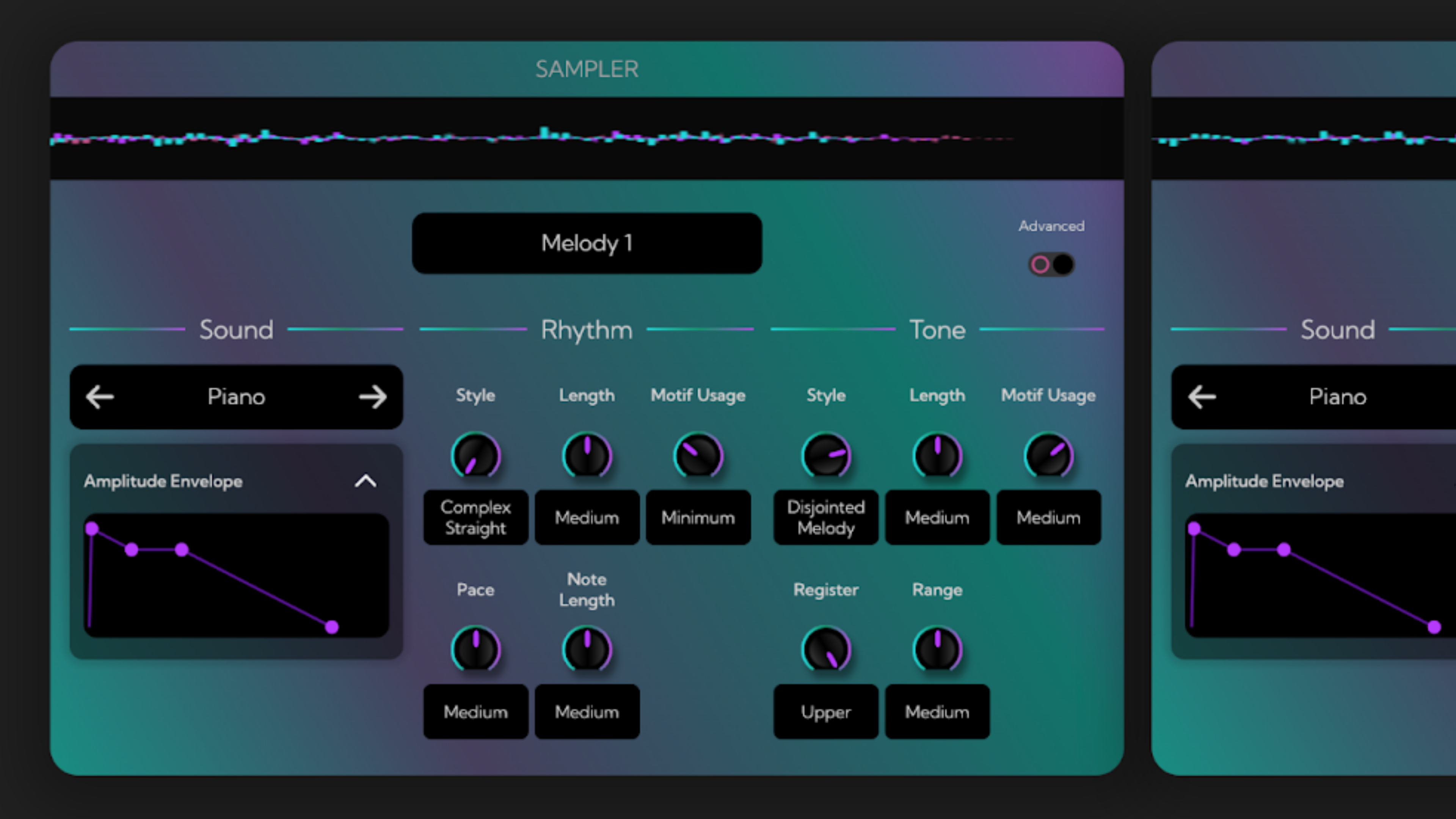
Midimaker.io offers a refreshing approach to MIDI generation by embracing aleatoric processes—a method that introduces controlled randomness into music creation.
The AI MIDI generator in midimaker.io works in a familiar, straightforward way: you select the tempo, key, structure, number of chords and melodies, and whether you want drums or bass — essentially a classic dropdown-to-MIDI workflow. What sets MIDI Maker apart is its “sampler” feature, a built-in instrument interface with multiple knobs that emulates a classic synth machine. Instead of traditional parameters like decay or attack, these knobs control aspects such as rhythm, motif, and style length for each MIDI line.
Once you’ve customized the sampler settings, you can download the MIDI and use it in your DAW. This makes MIDI maker particularly useful for artists familiar with synths and software like Ableton or Bitwig, where hands-on control over sound is key. It’s a free tool that’s ideal for quickly generating ideas and providing a strong starting point for compositions.
Midimaker.io is a solid tool for specific tasks — in other words, it excels at generating controlled randomness. It reminds me of Staccato — when you crank the creativity knob all the way up, you can also end up with surprising results. Both tools give you that sense of collaborating with the unexpected. However, it may be less practical for everyday use, particularly for artists who rely on strict beats and consistent chord progressions.
Price: Free (with paid “premium” / upgrade option - £9.95 ) Level: Beginner to Intermediate Format: Web App
AIVA: Early AI MIDI Generator
AIVA is a browser-based AI midi generator tool that specializes in creating orchestral and cinematic scores. Launched in 2016, it became the first virtual composer registered with SACEM, showcasing its pioneering approach to music technology.
AIVA uses musical parameters and existing pieces to influence its compositions. Users can select genres, tweak parameters, or upload MIDI and audio files to guide the creation process. This approach offers precision and control but may feel restrictive compared to the flexibility of text-prompt systems.
AIVA’s interface, while powerful, has a steep learning curve that can feel like mastering a new DAW. Its licensing model varies, with Free and Standard plans retaining copyright ownership under AIVA, while Pro Plan subscribers can gain full ownership if they meet specific criteria, such as being an individual or small business with less than $300k in annual revenue.
Besides that, AIVA now seems to be centering its efforts on a new model focused on text-to-music (audio). According to their blog, the model — called Lyra — can generate complete instrumental pieces, though it doesn’t yet handle vocals or sound effects. The team describes Lyra as just the first step, with new tools already being built on top of it, such as arrangement assistants and melody-to-stem converters. However, the last major update about Lyra was published over five months ago, and despite AIVA remaining a major name in AI midi generators world, it has faced growing challenges and a noticeably slower pace of innovation in recent months.
Price: Standard Plan $15 per month, ownership under AIVA
Level: Intermediate to Advanced
Best for: People who enjoy experimenting with parameters
Format: Web App, Standalone App
Sony’s Flow Machines: Ahead of Its Time, or Just Lost?
The popularity of Sony as a company, has stayed rather under the radar as an AI MIDI generator. One of the reasons for this may be because it doesn’t work like the others.
Instead of generating continuations of music that you give it, you can make music with Flow Machines by “training” your own AI midi generator. The Flow Machine then gives you several variations of melodies according to the training.
Here’s how it works:
Set parameters like key, tempo, and scale
Choose the guiding chord progression
Capture melodies (play them on a keyboard) that you want Flow Machines to use as a guide
Flow Machines creates several varieties of AI generated compositions based on your “training” inputs
If you have the standalone app (computer or mobile), you can download the MIDI file then load it up in your DAW. If you have the DAW plugin, you can upload it straight into your DAW.
Each of the training sets you make will be saved into “palettes”. You can think of palettes as directions for the AI midi generator.
If all of this sounds too complicated for you, Flow Machines also has preset palettes that you can use. There are over 100 presets in genres that include Pop, EDM, Jazz, and more.
Once you have the palette that you like, you can adjust the parameters and even select bars to regenerate.
Flow Machines is a great tool for seasoned musicians who have a good understanding of music and digital music production. It is different from the others because it requires you to have some idea of the music that you want to generate.
On paper, Flow Machines presents an intriguing proposition, particularly with its claim that users can “train AI.” In theory, this concept sounds incredibly powerful and appealing to aspiring composers. However, our extensive testing revealed a different reality.
While the idea of training an AI to understand your unique musical style is captivating, Flow Machines in practice seems to take user input and inadequately randomize it within the desired key and rhythm. If true, full-fledged “train AI” functionality existed, Flow Machines would likely be a far more popular tool.
Despite these shortcomings, Flow Machines does offer some niche utility. We found it can be somewhat useful for media composers who work in anime, thanks to several well-crafted templates tailored for that genre. When used effectively, these can support the composition process for specific stylistic applications.
Price: Free
Level: Advanced
Best for: Experienced musicians
Format: DAW plugin, Standalone for Mac, iPad app, iPhone app
Unison MIDI Wizard 2.0: Magic or Marketing?
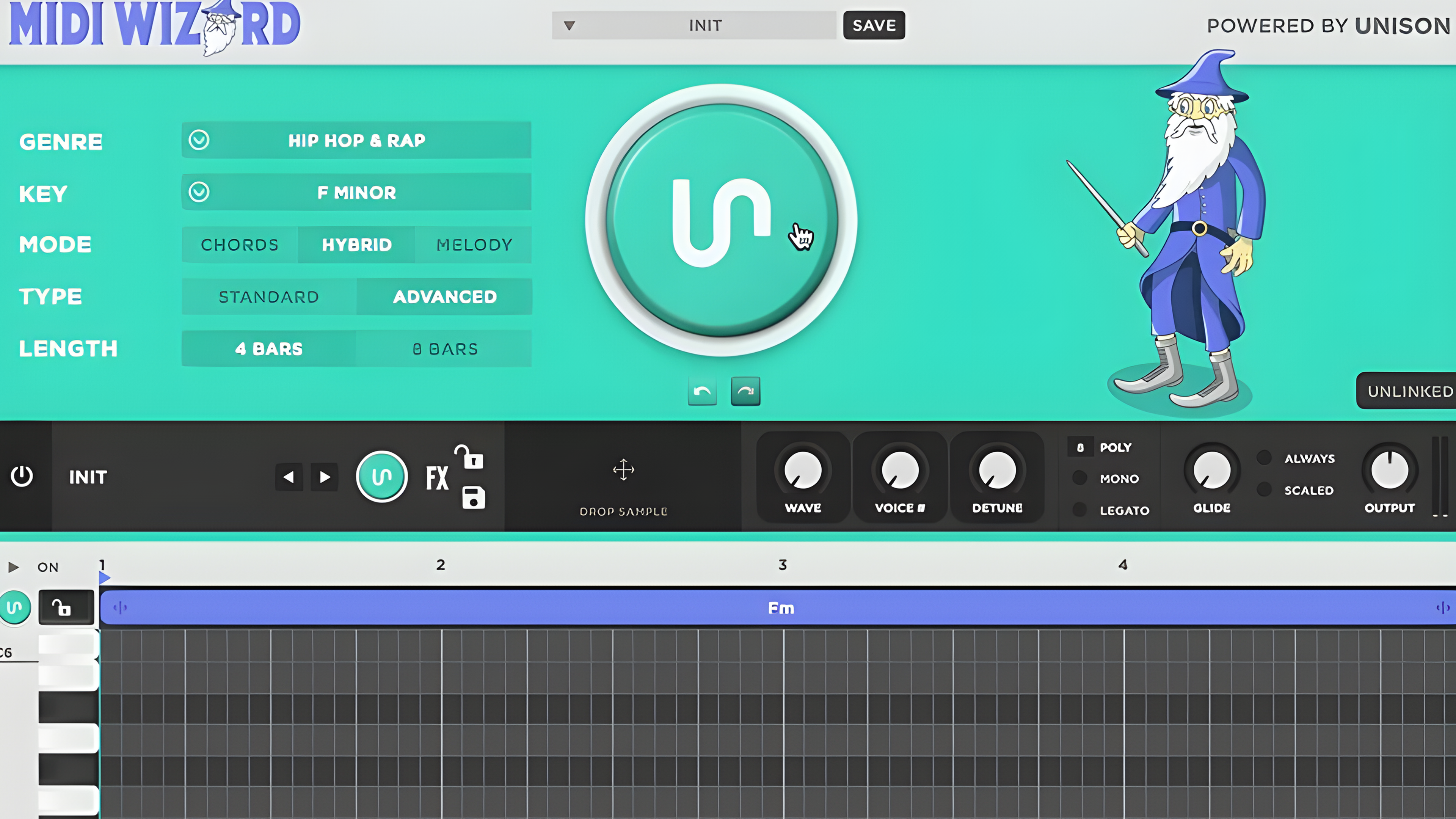
Unison MIDI Wizard 2.0, launched in late 2023, offers musicians a way to quickly generate chord progressions and melodies. Designed with beginners in mind, it lets users choose key signature, genre, and tempo, making it an easy entry point for streamlining the creative process.
However, the tool has faced criticism. Unison’s well-known chord packs have drawn skepticism from the production community, with many questioning their originality and overall value.
One advantage of Wizard 2.0 is that it works offline, but this raises questions about its technology. Is it driven by advanced AI like Magenta Studio, or is it simply pulling from a database of pre-made sequences?
The price is another sticking point. At $497, it’s significantly more expensive than many alternatives, and numerous online complaints highlight dissatisfaction with the product’s performance and Unison’s strict no-refund policy.
Beyond its features, Unison MIDI Wizard 2.0 is often criticized for its overwhelming marketing tactics, which some users say resemble those of less-trustworthy “scam-like” websites. The site constantly flashes pop-ups showing supposed live purchases in the corner of the screen, while an AI chat widget competes for attention on the other side.
Its “game-like” interface, packed with flashy visual effects, might look exciting at first but can quickly eat up system resources like RAM and CPU. While this approach may appeal to beginners drawn in by the visuals, the plugin’s high price, aggressive marketing, and mixed community feedback make MIDI Wizard 2.0 a rather controversial choice in the world of AI-assisted music creation.
Price: $397
Level: Beginner
Best for: Music producers who value offline functionality
Format: DAW plugin
MIDIGEN: The Loops Never End
MIDIGEN is a simple AI-powered tool that generates melodies and chord progressions straight into MIDI. It’s fast, free, and doesn’t even require a sign-up — you just jump in, click a button, and get royalty-free MIDI files you can use right away.
The generator mixes algorithmic composition with some basic music theory to create patterns you can drop into any DAW. You can set the key, tempo, and complexity, then export clean MIDI files that are completely editable and cleared for commercial use. It’s handy for quick pop progressions, sketching melodic ideas for a game, or even showing students how chord structures work.
Unlike loop libraries or sample packs, MIDIGEN always spits out original MIDI, which makes it safe to use for content creators worried about copyright. It’s especially useful for prototyping or breaking out of creative ruts since the AI draws from harmonic patterns across multiple genres.
That said, the site itself can be a bit clunky. It’s web-based, cluttered with ads and not the most comfortable interface. Still, if you just need quick MIDI without subscriptions, watermarks, or limits, it gets the job done.
Price: Free Level: Beginner Friendly Format: Web App (ad-heavy, clunky interface)
Staccato – Extend Feature: Automatically Continue Your Own Tracks
Staccato also comes with dedicated ‘Extend’ features, which work a little differently from the text-to-MIDI mode. When you prompt for an extension, Staccato analyzes your MIDI file and continues it in the same genre, key, and style, so your track grows naturally without losing its vibe. You can use it in both the standalone version and the VST plugin.
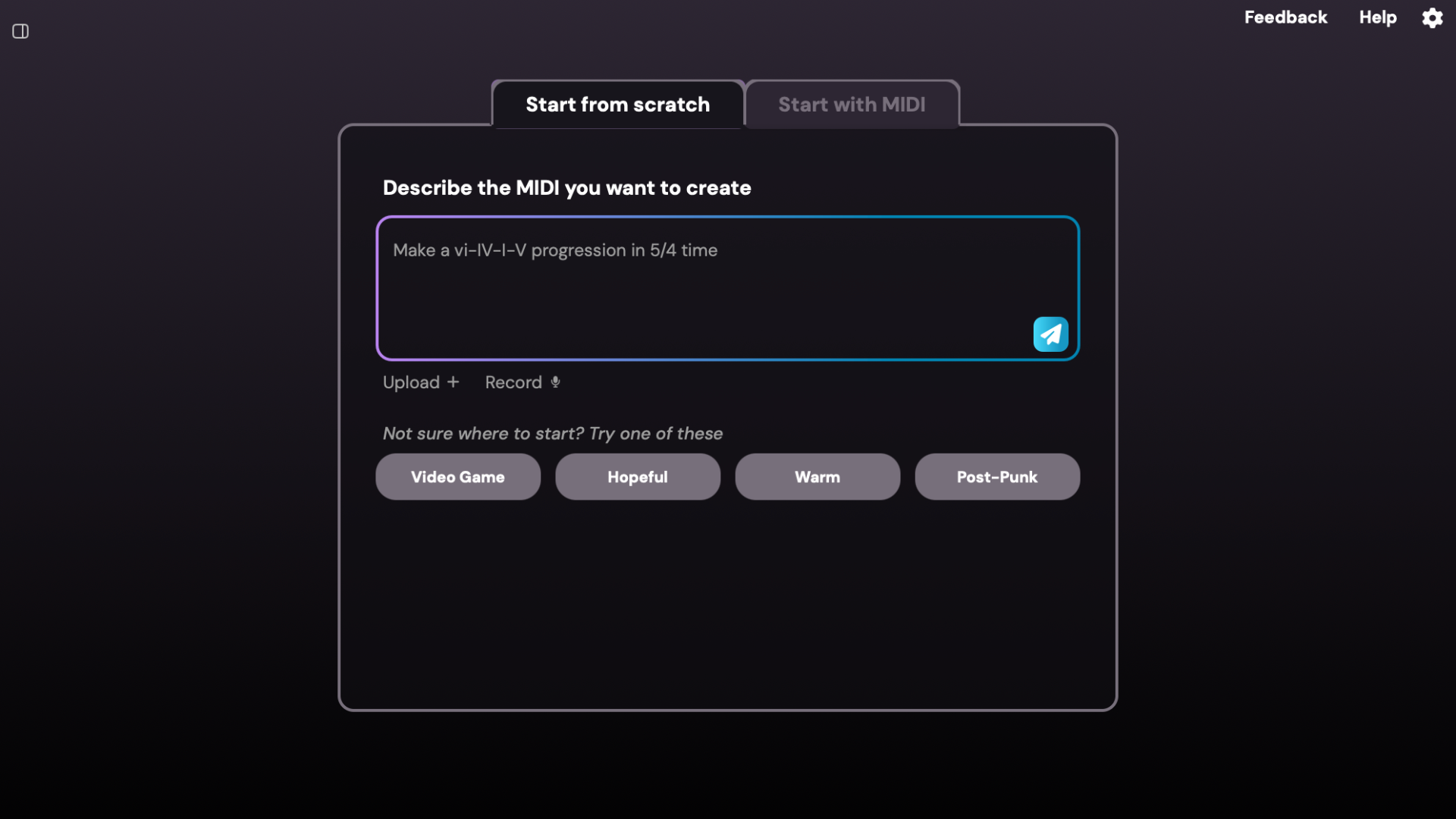
Getting started is simple: upload or drag and drop any MIDI file into the box, or build on something you previously generated. There's an adjustable "Creativity" slider available which allows you to fine-tune how adventurous or close-to-home the results should be. It’s a quick way to spark new ideas and explore fresh musical possibilities.
Staccato is a unique tool that combines the best of both worlds of AI MIDI generator functions in a single plugin. And most importantly, it still serves as your assistant!
Price: 7 Day Money-Back Guarantee – starting at $11.99 per month for premium access
Best for: Those with at least a little musical knowledge
How to use it: Tutorial Video - Extend
Format: DAW plugin, Standalone app
Text-to-MIDI AI
Cai.audio: A Unique Way to Brainstorm
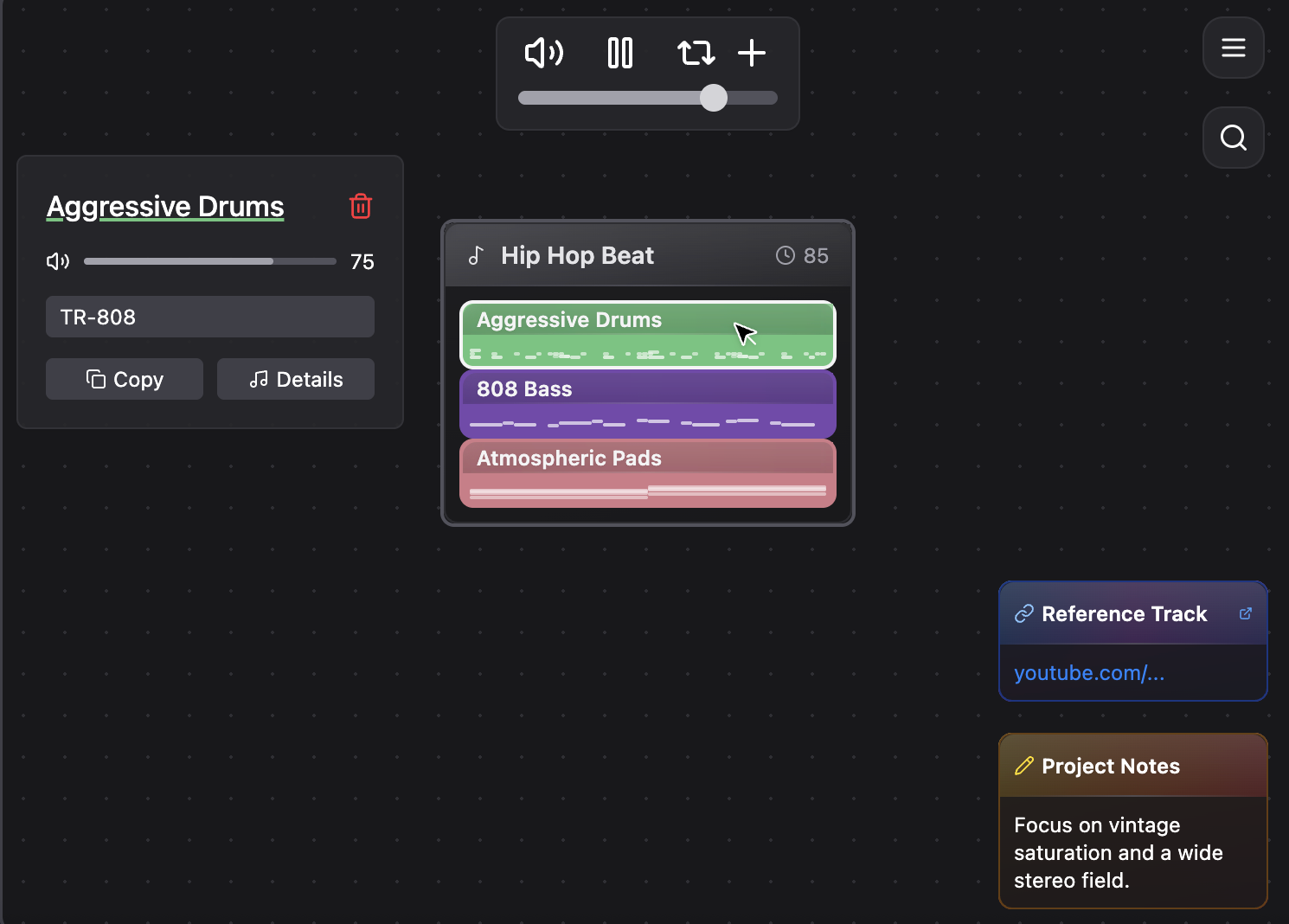
Working in cai.audio is pretty straightforward — you start with a canvas where you can create five different types of files: MIDI, photos, videos, notes, or links.
Once you’ve set up a MIDI track, you can type a prompt to generate new instrumental lines. Each new instrument is created in relation to the existing material, allowing your composition to evolve naturally and stay musically coherent.
This flexible setup is ideal for brainstorming and sketching ideas for future compositions.
The concept is fresh and promising, especially for collaborative songwriters who can share notes, ideas, and generate MIDI in one workspace.
However, the text-to-MIDI generator is slow and produces mediocre material. While it can spark ideas, it is not competitive with other tools on the market. On the positive side, Cai.audio offers pleasant-sounding instruments and supports microphone input, which adds extra creative options.
Price: Free
Level: Beginner
Best for: Everyone - Great for ideation stage
Format: Web-Based
Muse.art: An Extension of Ableton
muse.art is a fresh text-to-MIDI generator designed specifically for Ableton Live. What makes it stand out is its tight integration with the DAW — the plugin generates MIDI directly inside Ableton, so you can instantly hear and tweak results without switching windows. This makes the creative process faster, smoother, and far more natural than typical web-based tools and drag and drop VSTs.
Muse.art is a solid generator with accurate text-to-MIDI translation. It offers three main tabs — Melody, Bass, and Chords — which help the AI predefine the direction of generation without wasting resources on extra explanations. However, Muse.art also includes a Free Form mode, where you can type any prompt you have in mind.
In addition to the AI MIDI generator, Muse.art is among the first tools to experiment with text-to-synth generation, potentially marking the beginning of a new wave in AI-driven sound design.
Muse.art also features a text-to-audio function, designed primarily for creating short audio clips or samples, expanding its creative potential even further.
With a free trial available, it’s absolutely worth testing for anyone working in Ableton who wants to speed up idea generation or explore the frontier of AI-powered sound design.
Price: $12 per month or $80 perpetual license (7 days trial)
Level: Intermediate to professional
Best for: Ableton users; Synth users
Format: Ableton VST Integration & Web
ChordChord: Canvas - An AI Theory Tool
The web-based AI MIDI generator ChordChord, originally focused on button-driven MIDI creation, has recently added a text-to-MIDI feature. While still in early development, this new addition performs reliably with predefined styles, though more experimental or nuanced prompts can sometimes produce inconsistent results.
The core MIDI generator is fast, reliable, and reminiscent of the early stages of Wavtool.
A standout aspect of ChordChord is its clean, intuitive interface and well-organized menu, making it accessible even for beginners. This dual focus on usability and musical education reinforces ChordChord’s goal of helping users create and understand music more deeply. Additionally, the “Learn Chords” feature in ChordChord —currently marked as “coming soon”—demonstrates the company’s commitment to delivering not just AI midi generators, but also educational tools for students.
Alongside these updates, the company introduced Canvas, a new text-to-MIDI VST/AU plugin designed for sketching and expanding harmonic ideas with AI. Although we were unable to test it directly—since access is currently limited to private links shared via social media—early demonstrations suggest that Canvas is intuitive and musically grounded.
Users simply type a prompt (e.g., “moody neo-soul in A minor”), adjust style parameters, and generate results. Because it builds on ChordChord’s established harmonic framework, Canvas functions less as a “wild idea generator” and more as a musical assistant that keeps your creativity anchored in solid theory. In this sense, it can help users bypass extensive music theory courses while still producing coherent and stylistically appropriate results.
It’s worth noting that AI MIDI generator operates on a credit-based system: each purchase includes 100 credits, with one credit consumed per generation. While reasonable for casual users or learners, this model may feel restrictive for professionals who rely on frequent, high-volume MIDI generation.
Price: Creator Plan for $12 per Month & Pro Plan for $27 accordingly; Canvas $49 Perpetual license (update included)
Level: Beginner to Intermediate
Best for: Students and Beginners
Format: Web-based, VST Plugin
ChatGPT as Text-to-MIDI AI Generator
That’s right: the app that put AI on the map can now generate MIDI.
A year ago the process was clunky. ChatGPT produced only a text representation of MIDI, which you then had to paste into a separate text-to-MIDI tool in Google Colab (a coding interface) to download a file.
In the past few months ChatGPT can output MIDI files directly from a prompt. The results, however, are often basic, slow to produce, and not strong or creative enough for a professional workflow. A simple chord progression frequently took more than a minute for us to generate.
The reason is simple: ChatGPT is not an AI midi generator and not trained for music composition. That’s why we built Staccato and trained models specifically for MIDI creation.
Price: Free
Level: Intermediate to Advanced
Best for: Chat GPT Premium users (faster to generate than being on a free plan)
Format: Web App
What people did with it: BachGPT, JazzGPT
Wavtool: Discontinued AI DAW
WavTool was a browser-based DAW that aimed to revolutionize music production with AI-assisted tools like chord progressions, timbre transfer, advanced synthesis, stem separation, and audio-to-MIDI conversion. It also included an AI bot designed to inspire creativity and assist users in the production process.
That said, the platform wasn’t without its challenges. Its AI MIDI generator often required several attempts to produce usable results, and being exclusively browser-based limited its compatibility with traditional desktop workflows.
While WavTool initially drew attention within the music production community for its innovative AI-assisted workflow, the platform has since been acquired by Suno and transitioned into Suno Studio. This marks a new direction for the brand, but at the time of writing, Suno Studio doesn’t appear to include the AI MIDI generator functionality that once made WavTool stand out. Whether this feature will make a comeback—or if the new platform will take a different creative path altogether—remains to be seen.
Price: Previously offered at $20 per month before going offline. Suno Studio offers free plan
Level: Beginner–Intermediate
Format: Browser-based DAW
MIDI Agent: Transcribe MIDI with language
The AI MIDI generator is straightforward to use — open the plugin, type your prompt, choose the provider and model, and hit Generate. You can then save the MIDI file or drag it directly into your DAW’s timeline. There are also options to fine-tune parameters like scale, key, length, note density, and creativity.
Unlike other tools, MIDI Agent doesn’t use its own AI model — it simply connects to existing ones like ChatGPT, Claude, Gemini, or Grok. In other words, you’re essentially sending your prompts directly to those models through the plugin. You could do the same on your own without a subscription, though the plugin provides a more convenient interface. Because of this setup, generation speed and quality depend entirely on the connected model, meaning it can be just as slow as generating MIDI directly through ChatGPT. The resulting MIDI is functional but fairly basic, often requiring manual editing afterward. The software also includes an audio-to-MIDI conversion feature—similar to Staccato—which, while secondary, can be extremely useful for specific production tasks.
MIDI Agent supports all major DAWs, including FL Studio, Reaper, Logic Pro, Cubase, Ableton Live, Bitwig, and Studio One. The only current exception is Pro Tools, which requires an AAX format plugin, though support for it is reportedly coming soon.
Overall, MIDI Agent is a practical and flexible tool for both beginners and professionals.
Price: $20 per month or $99 perpetual license
Level: Beginner to Intermediate
Format: VST and AU plugins
Staccato: The Most Advanced AI MIDI Generator
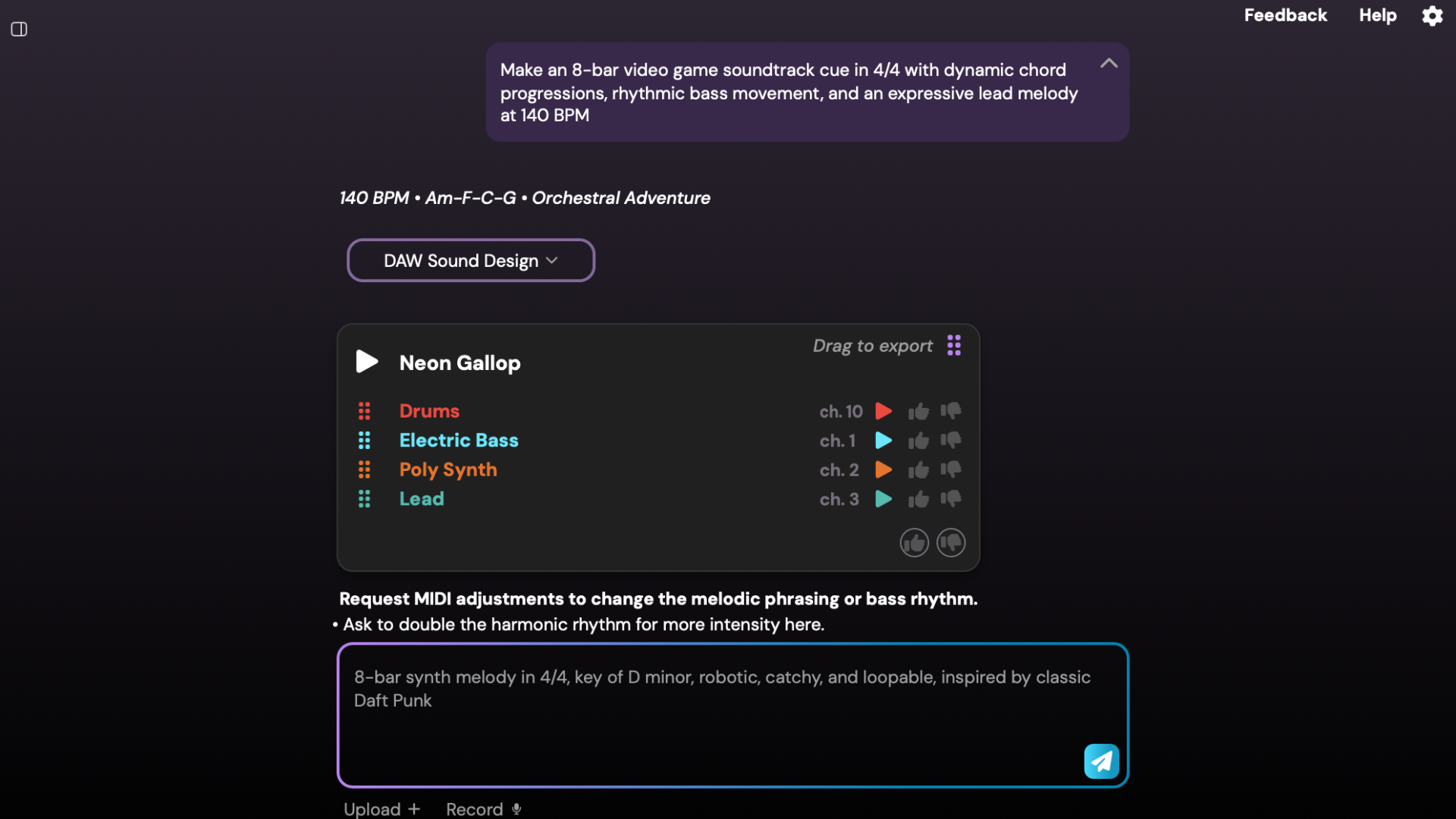
Staccato is available as a VST or AU plugin for seamless integration into your preferred DAW (Ableton, Logic, Cubase, Reaper, FL Studio, and others), as well as a standalone application.
Staccato’s text-to-MIDI feature is a game-changer in the world of AI MIDI generators. The tool transforms simple text prompts into detailed compositions, bridging the gap between abstract ideas and tangible MIDI creation. It’s worth noting that Staccato is currently the only tool in the world that can generate unique MIDI from text in a matter of seconds.
To use the text to MIDI AI generator, you just describe the musical elements you want — such as a "melancholic melody in A minor at 100 BPM" or "a driving rhythm with jazzy chords." Staccato’s AI midi generator processes the input and creates a MIDI-formatted file that matches the requested style, key, and tempo. This flexibility allows you to quickly experiment with new ideas and explore creative possibilities without starting from scratch.
Staccato uses a single chat-like interface, similar to ChatGPT. You can do three main things:
Create– Turn your ideas directly into MIDI and generate new compositions from simple text prompts. Ex. "melancholic melody in A minor at 100 BPM" or "a driving rhythm with jazzy chords".
Rewrite– Take existing MIDI material and instantly produce fresh variations (perfect for reworking drum patterns or melodies). The prompt could be something like: “Vary the drum pattern.” You can also make it more specific, for example: “Vary the drum pattern by adding syncopation on the 2nd and 4th beats of each bar. Create 8 bars total, with a fill-in every 4th bar.”
Accompany– Generate complementary parts to enrich your arrangement, such as adding strings, bass, or harmonic layers. The prompt for that could be something like: “Add a strings layer.” Being more specific usually gives better results, so you could write something like: “Add a string layer in a drone-like style using two violins, a viola, and a cello in the high register.”
Your starting point depends on your goal: upload existing MIDI to enhance it with Rewrite or Accompany, or start fresh with Create to build something entirely new.
With Staccato, you aren't passively receiving computer-made music. Instead, you have an interactive partner that helps you bring your own musical ideas to life. It provides an accessible way to guide the AI collaboration and see your vision take shape.
Price: 7 Day Money-Back Guarantee – starting at $11.99 per month for premium access
Level: Intermediate/Pro
Best for: Those with at least a little musical knowledge
What people did with it: Scroll down on these linked pages to hear what Create, Rewrite, and Accompany can do.
Format: DAW plugin, Standalone app
Special Mention: Audio-to-MIDI AI
Samplab
Samplab is an innovative audio-to-MIDI transcription tool that makes it easy for music producers to extract melodies, chords, and rhythms from audio samples.
The user-friendly drag-and-drop interface lets you get started quickly by loading in any audio file. Samplab analyzes the audio and generates a MIDI-formatted version, separating out the drums, bass, vocals, and instruments into different tracks.
One standout feature is the transcription speed. Within seconds of uploading your file, accurate results are displayed and ready for you to edit or export. The generated notes are mapped to the key signature you specify, or you can disable this to enable chromatic editing freedom.
The free version of Samplab offers these core transcription features for samples up to 10 seconds.
For those able to pay, Samplab's paid premium version ($9.99/mo subscription) unlocks additional capabilities:
Unlimited audio track length
Polyphonic editing tools to refine multi-instrument parts
Smart warping algorithms to easily match samples
Fine-tune pitch, pan position, and more
In my experience, Samplab is pretty accurate. Even with the free version, you can turn longer audio samples into MIDI by converting 10 seconds at a time. The DAW integration is also extremely convenient because it takes away that extra step of having to download the file.
Price: Free – $9.99 for premium (14 day free trial)
Level: Beginner-Intermediate
AI-MIDI.com
One of the simplest applications so far, AI-MIDI takes your audio files, asks you to fill in a couple of parameters, and, seconds later, a MIDI-formatted file is automatically downloaded into your computer.
There is no preview option, so you will need to have a DAW handy to load the files and see how the program did in translating the audio to MIDI. Don’t let its simplicity fool you, though. After trying a couple of files, it does succeed at getting things right, if not pretty close (though vocal takes with lots of vibrato yielded some interesting results). Nothing is daunting or intimidating here either, making it very easy for newer music makers.
AI-MIDI was created by AudAI, which also makes another application called Vox Factory.
Level: All levels
Best for: Those who want a MIDI-formatted version of a sample, a melody or other harmonic content
Spotify Basic Pitch
Spotify's Basic Pitch is an online web app allows you to record or upload any mono-instrumental audio recording like piano, guitar, or voice. Basic Pitch then instantly analyzes the audio using AI note detection developed by Spotify and generates a MIDI-formatted file download.
A major advantage is that Basic Pitch works with instruments playing multiple notes like chords or harmonies. Many audio-to-MIDI tools struggle with multiple simultaneous notes, but Basic Pitch handles them with accuracy.
The AI model also detects subtle pitch bends and expressions, so the output conveys the nuance of a live performance. You can also adjust the MIDI before downloading it so the file sounds exactly how you want it.
After downloading the output, you can import it into your DAW for editing and refinement.
Basic Pitch is also a mobile-friendly web app, so it brings accessible audio-to-MIDI conversion to iPhone and Android users.
Basic Pitch provides basically the same capabilities as the premium Samplab version for free, so it is definitely worth checking out. The major downside to Basic Pitch is that you have to download the MIDI-formatted file before bringing it into your DAW which is a step that Samplab eliminates with DAW integration.
Level: Beginner-Intermediate
MIDI AI FAQs
Can AI generate MIDI?
Yes! Staccato is a prime example of the opportunities with AI and MIDI. Over time the tool will only continue to improve as AI models get better.
Is there a program that converts audio to MIDI?
You can convert audio to MIDI using tools like Spotify Basic Pitch. You can also use the audio-to-MIDI feature in Staccato’s VST plugin and standalone app.
Do I own the music created via AI MIDI generators?
This depends on the tool that you use. At Staccato, we train our AI MIDI generation models responsibly, using only data that respects artists and their copyright. This means anything you create with Staccato is yours to use however you want.
Can ChatGPT generate MIDI?
You can, but ChatGPT wasn’t built to produce high-quality MIDI, so results can be repetitive and less creative. It also takes a long time to load, as we discuss in the article above. If you want unique MIDI, use one of the tools we recommend in this article.

Dr. Jeffrey Lupker - Co-founder, Staccato
International Speaker & Published Author on Deep Learning & Music.
Dr. Lupker has published peer-reviewed journal articles and book chapters and has given lectures internationally in the fields of deep learning, machine learning and music. Beyond Staccato and his own research, Dr. Lupker is an active performer on guitar and keyboards and has played across Canada and USA with award winning artists.